
Yi Home
Kami HKLifestyle
2.733.34K Reviews
- Version
- 6.9.8_20260826105838
- Installs
- 5.00M
- Age Rating
- Everyone
Screenshots

Our Review of Yi Home
 Analysis by Appyee
I treat a home-monitoring app differently from an ordinary lifestyle tool: it may put a live view of a private room within reach, so convenience is only part of the decision. Yi Home is made by Kami HK and is intended for people using connected Yi devices. I would judge it not just by how quickly it opens a camera feed, but also by whether its controls fit the way I actually want to monitor my home.
Deciding what kind of monitoring you need
For someone who already owns Yi equipment, having one app to manage those devices is a practical starting point. The app is free to install, has an Everyone content rating, and sits in the lifestyle category, though some in-app purchases are offered. It has been available since November 10, 2015, and its current version is 6.8.5_20260115054026. It requires Android 7.0 or later; iOS users should check the requirements for their own device before installing.
Its broad adoption—more than five million installs—suggests many people have tried it, but popularity is not the same as a guarantee that it will suit every household. The average rating is 2.8 from around 363,000 ratings, with about 32,000 written reviews. I read that as a reason to approach it with measured expectations: the app may be useful in the right setup, but I would not assume every camera, network, or user experience will be trouble-free.
Start with the device, not the app
Before choosing it, I would first make sure the Yi device I plan to use is compatible with the app and consider where it will sit. A camera pointed at an entryway has a different purpose from one aimed at a shared living area. Thinking through that placement first helps me decide what I need to see and when an alert would genuinely be useful, rather than turning on every available notification and regretting it later.
This is also where Yi Home differs from the usual alternatives in the lifestyle and home-monitoring space. A general smart-home app may be a better fit for someone who wants to bring devices from several brands together. A camera maker’s own app, by contrast, is often the more direct choice when the household is built around that maker’s equipment. I would choose Yi Home for a Yi-centered setup, not as a presumed universal dashboard for every connected product.
Trust starts with deliberate choices
With any camera app, I take a moment to decide who should be able to view a feed and which rooms should be monitored. I avoid positioning a camera where a visitor or family member would reasonably expect privacy, and I would tell other people in the household what is being monitored. Those simple habits matter regardless of which app is installed.
I also recommend reviewing the app’s current permission prompts and account settings on the device before relying on it. Grant only the access that makes sense for the functions you intend to use, and revisit those choices if your setup changes. I would not treat a familiar interface or a camera feed as proof of how recordings are handled; for sensitive questions about storage or account practices, check the app’s current disclosures and settings directly.
A routine that keeps alerts useful
A realistic use for this kind of setup is checking the front room while away for a short errand. I would open the live view when I have a specific reason to look, then close it rather than leaving a camera feed running without purpose. If I use alerts, I would begin with a narrow notification setup and adjust it after seeing which events are useful. That makes the phone less noisy and gives each alert a clearer meaning.
One useful trade-off to keep in mind is that more monitoring is not always better monitoring. A camera aimed at a busy window or a frequently used room can produce a stream of activity that is hard to interpret. A carefully chosen angle and a sensible notification routine can be more helpful than adding cameras or enabling every alert. I would also check that the phone has a dependable connection before expecting a live view to load quickly when I am away.
Costs and expectations
The app itself is free, but in-app purchases range from $3.99 to $184.99 per item. I would check the purchase details in the app before committing to anything, especially if a feature or service appears to require payment. That price range is broad enough that I would avoid assuming an advertised or optional feature is included just because the app can be installed without paying.
For someone comparing options, the key question is not simply which app has the longest feature list. It is whether the hardware they already own works with the app, whether they are comfortable using that company’s ecosystem, and whether the app’s account and storage choices suit their privacy needs. If cross-brand control is the priority, a broader smart-home platform may be more convenient. If a person wants no camera account or remote viewing at all, a locally managed alternative may be a better match.
Getting Started with Yi Home
First things first, setting up the Yi Home app was a breeze. After downloading it from the App Store, I was guided through a straightforward setup process. Connecting my Yi camera to the app was as simple as following a few on-screen prompts, and in no time, I was peeking into my living room from my phone.
User Interface and Experience
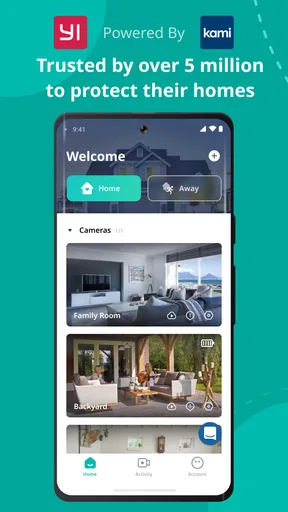
The app’s interface is clean and intuitive, making it easy even for less tech-savvy users to navigate. The home screen gives you a quick overview of all your connected cameras. Each camera feed is displayed in real-time, and tapping on one gives you a full-screen view with additional controls.
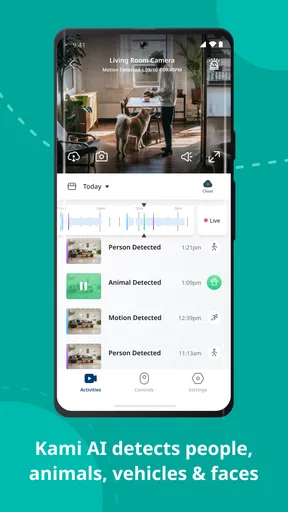
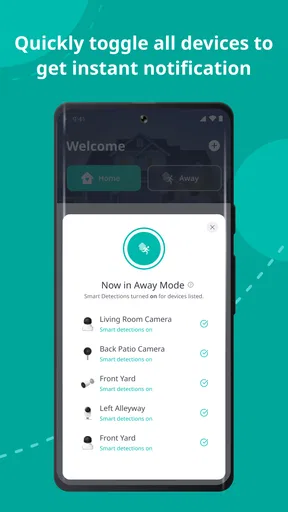
What I found particularly useful is the ability to customize alerts. You can set the app to notify you only when it detects human movement, which cuts down on unnecessary alerts triggered by pets or passing cars. This feature alone is a game-changer, ensuring you're only alerted when something truly needs your attention.
Features I Loved
One of the standout features of the app is its advanced motion detection. It uses AI technology to distinguish between different types of movement, so you’re not constantly bombarded with notifications. Plus, the app offers a two-way audio function, which is perfect if you need to communicate with someone on the other side of the camera.
Additionally, the app supports cloud storage, meaning you never have to worry about losing video footage. It also offers local storage options, which could be a lifesaver if you prefer keeping everything in-house.
The Little Things Matter
Another neat feature is the ability to set up scheduled recordings. Suppose you want to monitor your home during specific hours; you can set the app to start and stop recording automatically. This gives you peace of mind without having to manually start the camera each time.
Night vision is another feature that works surprisingly well. I was impressed by the quality of the footage even in low-light conditions. The infrared LEDs ensure that you get a clear view, come night or day.
Room for Improvement
While the app performs admirably, there are a couple of areas where it could improve. Occasionally, the app would lag when loading the live feed, which can be a tad frustrating if you’re in a hurry. Also, while the user interface is generally intuitive, I felt that the settings menu could be more organized.
That said, these issues are relatively minor and don’t detract significantly from the overall experience. It’s clear that the developers have put a lot of effort into making a user-friendly app that does what it promises.
Final Thoughts
After spending some quality time with the app, I can confidently say it’s a solid choice for anyone looking to enhance their home security. From its simple setup to its robust features, it provides a comprehensive solution for monitoring your space. Whether you’re a tech enthusiast or just someone looking to keep an eye on things, this app delivers on all fronts.
So, if you’re in the market for a reliable home surveillance app, give Yi Home a try. It's a worthy addition to your smartphone, ensuring peace of mind with every notification.
Verdict
Strengths of Yi Home
- Easy setup process for quick installation.
- High-quality video resolution for clear monitoring.
- Affordable pricing for budget-conscious users.
- Motion detection alerts for enhanced security.
- Two-way audio for real-time communication.
Limitations of Yi Home
- Limited cloud storage options available.
- Requires strong Wi-Fi for seamless streaming.
- Subscription needed for advanced features.
- Occasional connectivity issues reported.
- No local storage without extra hardware.
Other Releases by Kami HK
View All
Yi iot
Video Players & Editors2.5
Similar Picks in This Category
View All
SmartThings
Samsung Electronics Co., Ltd.4.6

Google Home
Google LLC4.0

Pinterest4.2

Astrotalk - Talk to Astrologer
Astrology & Horoscope4.7

My Verizon
Verizon Consumer Group4.5

Samsung Wallet (Samsung Pay)
Samsung Electronics Co., Ltd.4.1
Frequently Asked Questions
What features does the Yi Home app offer for home security?
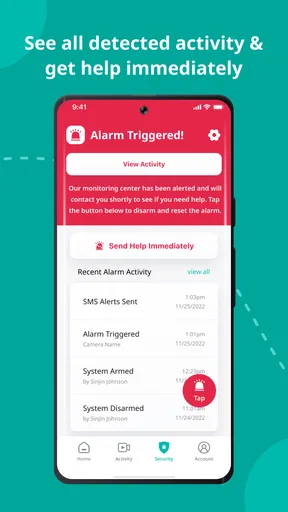
The Yi Home app provides a range of features designed to enhance home security. These include real-time video streaming, motion detection alerts, and two-way audio communication. Users can also benefit from night vision capabilities and cloud storage options, ensuring access to footage anytime, anywhere. Additionally, the app supports multiple camera connections for comprehensive coverage.
Is the Yi Home app compatible with both Android and iOS devices?
Yes, the Yi Home app is compatible with both Android and iOS platforms. It can be downloaded from the Google Play Store for Android devices and the Apple App Store for iOS devices. The app ensures seamless integration, allowing users to monitor their home security systems effortlessly across different devices.
How does the Yi Home app handle data privacy and security?
Yi Home takes data privacy and security seriously, employing advanced encryption protocols to protect user data. The app uses end-to-end encryption for video streams and stored footage, ensuring unauthorized access is prevented. Regular updates and security patches are provided to maintain a secure environment for all users.
What are the subscription costs associated with the Yi Home app?
While the Yi Home app itself is free to download, users may choose to subscribe to cloud storage services for a fee. The subscription plans vary, offering different levels of storage capacity and retention times. This allows users to select a plan that best suits their needs, whether for basic or extended video storage.
Can multiple users access the Yi Home app simultaneously?
The Yi Home app supports multiple user access, allowing family members or trusted individuals to monitor the security system. Users can grant access permissions to others, ensuring that everyone can stay informed and respond to alerts when necessary. This collaborative approach enhances the overall security and peace of mind.
